Showing posts with label social. Show all posts

Thursday, 13 August 2020

Top 6 Best Social Media Schedulers 2020

Top 6 Best Social Media Schedulers 2020

With a social media scheduler, you can plan your content in advance and schedule posts to be sent out automatically. There are a host of features built into these programs, designed to teach you how to build a bigger following and increase engagement.


The best social media schedulers could reduce your weekly workload by a significant amount if you promote your creative work through social media. Stats say that users who share above seven posts in a week are likely to gain the most engagement across their social media pages, and that takes time.

6. TweetDeck

TweetDeck is a pretty basic scheduler that was bought by Twitter, and, unsurprisingly, it only encompasses Twitter itself. However, though there are not many other features, it does do Twitter scheduling well – in an uncomplicated way. It may only be a browser platform but it has a clean, bright UI, plus there are a few nifty tricks that will improve your experience immensely.

Content is organised through custom columns, which you can create yourself to track pretty much anything you like through targeted streams. Think keyword mentions, lists and saved searches.

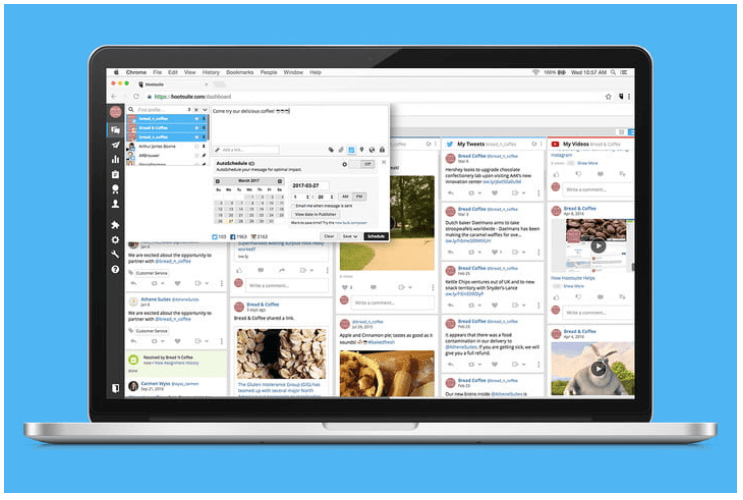
5. Hootsuite

Hootsuite is one of the leading social media management tools, and it truly does do it all. It offers a free forever plan that will do the job well if you just want to schedule content.

The Streams tool is a clear winner, allowing you to schedule, manage and sort your posts across social media channels without having to log in to your separate accounts. It can be hard to find a decent free scheduler that works this well across all channels, and Hootsuite's free plan even has basic analytics. 

4. Postcron

If you're looking for a scheduler that does just what it says on the tin, this is your best bet. Postcron is ridiculously simple in its focus: it schedules and auto posts, and that's it. You can bulk upload, which saves time, and the ability to add a watermark is a nice touch.

There are no extras here – there are zero analytics, and no editing or curation tools. But if you just want to be able to schedule, for a reasonable price and with a clean, useable UI, this is a safe choice.

3. Sendible

A powerhouse of a social media management tool, Sendible really does do it all. Aimed at increasing productivity for agencies managing multiple clients, the platform has a slick dashboard interface that allows you to switch between clients easily, and the facility to collaborate with teams/clients on content and campaigns.

Functions for scheduling and auto-posting are included in the toolkit, alongside powerful analytics via reports, automation tools (like automatic replies), grouping posts by teams, and content libraries that house all your evergreen content for reuse.

2. Later

Later provides stats on your account that become more detailed as you move up the price plans, but these are pretty limited at the lower price points, and even the most in-depth analysis doesn't match that of other schedulers.

And it does that job really well. Due to Instagram's regulations, you can't auto post content on the site unless you're a business page (and even then, only on single image posts), so bear in mind that if you're not, you'll only be able to schedule posts then publish them manually.

Later is unapologetic about being mostly for Instagram, in fact it tags itself as the number one Instagram scheduler. But, you'll get notifications from Later at the specified times, and all you need to do at that point is press publish on the content you've already created.

1. Smarter Queue

Smarter Queue's analytics are pretty powerful and will give you information on optimum posting times, enable you to compare engagement between content types and analyse your social history plus your competitors.

Smarter Queue is a young tool but it's shaping up to be a fierce contender in the social media tools space. You do this by inputting urls or dragging and dropping into the visual calendar so your plan is laid out clearly in front of you. The platform is category-led, which means you set up multiple categories each with different posting plans, such as which profiles are to be posted to, and add content to each category as you create or find it.

Friday, 27 September 2019

Top 10 Instagram Marketing Tips

Top 10 Instagram Marketing Tips

Instagram can be a very tricky platform to use for marketing purposes simply because there have been a lot of new regulations and community guideline updates in recent years. While these new guidelines do restrict how you can approach marketing on the platform as a whole, there are still some very effective and viable ways for you to reach a larger audience.

Nothing can beat organic engagement and interaction with your followers, even when you buy Instagram likes you still will not be engaging with your audience in a way that brings real value to them. In order to be successful with your Instagram marketing strategy, you will need to find ways that you can connect with people in a meaningful way instead of posting repetitive comments that are bland and general.


Look at the top 10 Instagram marketing tips below if you still want to experience the benefits of how powerful the platform can be for business and other areas of your endeavors.

1. Change your profile to a Business account

By changing your profile to a business account, you will change the way that Instagram looks at your profile in its algorithm. Business profiles are promoted more often and get more engagement because they are seen as more legitimate profiles than individual users alone.

2. Use what Instagram provides

Instagram is already packed with a lot of integrated features you can use to further your marketing efforts, the sharing feature and direct messaging are two of them.

3. Tease your audience

Post previews and upcoming announcements about your products or services before they are released to get people engaged that will keep coming back to your profile.

4. Sponsor some influencers

Consider reaching out to people who already have a large following that would likely be interested in your products or services as well and ask them if they would like to do a paid advertising partnership with you.

5. Utilize Instagram stories

Instagram stories is a fairly new feature however people engage with user stories a lot so by adding one or two stories a day, you can see a dramatic change in your engagement numbers.

6. Use Instagram Ads

This can be a really great way to reach a wider consumer base because it allows you to target specific people with specific interests making more efficient use of your advertising budget.

7. Use hashtags

Hashtags are an essential part of the Instagram platform so consider creating your own unique hashtags that represent your brand to reach a wider audience than you currently are.

8. Choose the times you post wisely

Instagram has a weird algorithm that pushes content to people when they are expected to be online the most. Let’s say you post some content to your profile at 3 am, if you posted the exact same post at 3 pm you would see a significantly higher rate of all-around engagement and likes because people are likely to be online at 3 pm more than they would at 3 am.

9. Track the proper analytics

Instagram provides you with in-depth analytics reporting and tracking as a standard feature with business profiles. However, there are many different metrics that the platform tracks, to make sure you’re gaining real results. You should only pay attention to your follower growth rate and the amount of engagement that you get ie likes, comments, etc.

10. Give your profile a theme

People tend to interact with brands and people who are familiar with and maintain a sense of uniformity. By making sure that your profile maintains a similar look and “personality” consistently, you can increase your engagement sustainably.

Instagram is a powerful platform that allows you to brand and market like no other, take advantage of it and buy Instagram likes to start seeing the interaction you want.

Monday, 13 May 2019

Get Ready To Post Long-Form Instagram Video Stories Soon!

Get Ready To Post Long-Form Instagram Video Stories Soon!

Instagram is soon rolling out a new feature for existing and new users. Excited! What’s it? Long-form video-based stories. Yes, you’ll soon be able to share videos more than one-minute to almost an hour longer on your favorite social media platform. With almost 800 million active users, Instagram is in its golden phase of popularity, all because of the rich user interface and ease of use. 

Last year, Mark Zuckerberg himself reported that Instagram features, especially the story one, attract the most of daily active users. This article provides you with the information on posting Instagram Video Stories.


Uploading short videos on social channels is now on trend, that is getting a lot more popular than any time before. If you are a regular user of Instagram, you might be aware of the current video feature which is limited to just one-minute videos, thereby restricting the user to post lengthy videos. However, the recent report issued by the Wall Street Journal has surprised by Instagram users by announcing that Instagram will soon allow its users to post hour-long videos on the platform.

Instagram was founded in 2010, by the Stanford graduates Kevin Systrom and Mike Krieger, as a photo sharing social app. Designed for the iPhone users, it soon became a sensation. The ultimate photo filters it offered to transform the way a photo looked boosted its online success. Now, Instagram is supported by all iOS, Windows & Android devices.

To further enhance its popularity, the new long-video support is believed to an interesting feature which will surely amaze the new users to create a profile and enjoy the long video stories. There are several other reports, like the one from the TechCrunch which is also announcing the Instagram’s new plan of adding a new section in its app for long-format videos, so as to compete its top-most rival Snapchat’s Discover. Before deciding to roll-out the new feature, Instagram has been secretly meeting with the content publishers and creators for the proposed feature and its potential.

Though the date of launch is June 20, it’s all tentative and can change anytime. There are rumors indicating that the videos will be in a vertical orientation and support 4K resolution. The main point of the long-term video is it’ll be taller than it is wide.

Meanwhile, Instagram users will get an option to continue watching to prolong the video viewing session. To make it easy to find the content or story uploaded by a user, their profile will display the video content in story highlight bubble. Moreover, only pre-recorded videos are allowed for upload without any option of image editing. 

Currently, the time limit for videos is 60 seconds in Instagram feeds or posts and 15 seconds in the Instagram Stories. The Wall Street Journal report claimed that the new video posting feature will allow users to post videos of up to 60 minutes in length. With this amazing feature, Instagram aims to attract more users which will simultaneously boost its success.

Since many social media platforms allow users to upload video statuses and even live videos, this is a small effort taken by Instagram to take over its competitors. Basically believed to be a photo sharing app, Instagram is no more just a photo sharing app now, instead, it’s on the way to become a long video sharing app soon. Though the company held several discussions with the content creators, it’s still not clear; the new time limit will only be applicable to the Snapchat-styled features. Instagram is working to extend the time limit to the non-broadcast clips.

Instagram provides support to advertisers by playing advertising videos. The long-video feature will be of great benefit to the brands, services, and advertisers who want to attract more loyal customers with a long story or moral telling advertisements. Also, playing advertisements over this extended platform owned by Facebook could help in monetizing the sizeable audience of this so called photo-sharing app.

According to a recent report, Instagram boasts near around 800 million active users, out of which almost 500 million use this social media platform every day. With the rolling out of this new feature, Instagram will be the first in line to take on YouTube which is one of the most popular platforms among teenagers. Many tech savvy’s believe that Facebook is expanding its battle with YouTube and other services with the Instagram’s new extended video feature.

So, you all might be excited to upload long-video stories to your Instagram profile, so are we. Let’s wait until June 20, as most possibly the feature will be rolled out on this date or within this month. Get ready to capture your precious live moments in video format and stay in line to upload them to let your social circle watch what you are doing or how much fun you are having. Wait for the best!
5 Awesome Social Media Management Tools

5 Awesome Social Media Management Tools

Today’s entrepreneurs do all sorts of things to stay ahead of their competition, which clearly has reached new heights. So, they spend huge amounts of money on creating some of the most spectacular websites, work on building powerful brands and invest in a variety of digital marketing channels including social media. 

In fact, there are countless reasons why your business needs a strong social media presence today more than ever. But do you know how you can make the most of it? With a social media management tool, of course!

What is a social media management tool?

A social media management tool is a software or web-based service that allows you to manage multiple social media accounts, schedule posts, collaborate with your team, track performance of your campaigns and much more in a well-organized environment.

If you want to get the best results from your social media campaigns, then using a proper social media management tool is a must. However, there are a variety of options in the market which have different features and prices. So, which one should you pick? Let’s find out!

What are some of the best social media management tools?

Although there are dozens of social media management tools that you can use today, the following are the ones that are highly recommended:

1. Hootsuite


Hootsuite was one of the pioneers of social media management and the years of experience it has now is apparent in the performance it delivers.

Hootsuite supports over 35 popular social media platforms including Facebook, YouTube, LinkedIn, etc. and allows you to manage all your profiles from a single dashboard. You can set up a stream for each account individually and organize multiple streams into groups with tabs. You can also auto-schedule your social media activities so that you are connecting and interacting with your fans even when you aren’t at the desk. You can easily upload your content files in bulk in advance and it will upload them for you as per the conditions set by you.

Some of the salient features of Hootsuite are:
  • Advanced team management facility
  • Customer service management for Twitter
  • Cross-platform support (Windows, Linux, Mac OSX, and even mobile platforms)
  • Free reports via email

2. TweetDeck


As the name suggests, TweetDeck is a social media management tool designed only for Twitter. However, if it’s only Twitter that you are focusing on, then it will help do you a terrific job at marketing and connecting with your target audience. It can help you fix all the problems because of which you are not getting results on Twitter– easily and quickly!

The first thing you need to know about TweetDeck is that it’s owned by Twitter (acquired it 2011) itself. Thus, you know you are in the right hands. However, you don’t have to trust it going by the face value alone. It does pack quite a punch with numerous options and features that make Twitter management more efficient and faster.

For starters, TweetDeck allows you to interact with your followers with multiple customizable columns rather than a single timeline. You can separate these columns on the basis of factors like hashtags, search results, and messages. You also get to schedule your Tweets (you can schedule tweets for multiple accounts too). Plus, there is a built-in analytics module that helps you keep a close eye on your Twitter performance across multiple accounts.

3. Tailor Social


Tailor Social is another top-quality social media management program that’s relatively newer than its counterparts. However, it offers many features that are non-existent in the old ones. This because apart from standard content automation features and social calendar support, it also helps you create premium content for your platforms on the go.

With Tailor Social’s design feature, you can create beautiful and unique images that you can share on your social media accounts directly. You can customize every small detail from font sizes to colours, and from photo filters to backgrounds. It also has a simple yet powerful analytics feature that allows you to track the performance on every individual post on the basis of factors like engagement and audience, all of which are presented in numerical values for measurable results.

4. Sprout Social

Simply put, Sprout Social is a collection of tools that are designed to help you manage all your social media channels with greater control and flexibility. Some of the features that make it stand out from the other options include influencer identification, smart inbox, and social listening. It even has a decent support for customer relationship management which is really important if you want to learn about your customers and enhance business efficiency.

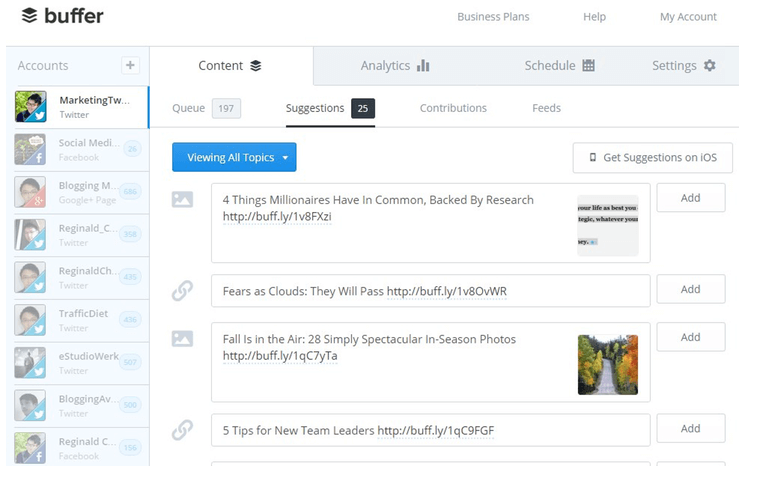
5. Buffer


Although Buffer is known as a social media management program, it’s more along the lines of a “content publishing platform”. That said, it’s a powerful tool to have nonetheless.

You get all the features you would expect from a tool like Buffer including publishing and RSS. These include scheduling and adding posts and publishing posts from your blogs (with RSS). In For social engagement, you can use its Reply feature which makes it easier for you to respond to social conversations in a single team inbox. 

This means that you don’t have to switch from Facebook to Twitter or Instagram as you can respond to the messages from one location. You can also assign conversations to your team members or communicate privately with internal notes.

Overall, Buffer is indeed a quality product that you can benefit from a lot. The only thing missing here is support for influencer search but that’s not really a deal breaker unless you need it absolutely.

So, there you have it- some of the best “bang for a buck” social media management tools that you can use today. You can use most of these on trial and invest money only if you are satisfied. So, why not give them a shot and see for yourself what they have to offer? Good luck!

Monday, 8 April 2019

Top Instagram features for business

Top Instagram features for business

Instagram is one of the most popular social media networks for sharing videos and photos. The developers developed this primarily for only iOS users on October 6, 2010, and published through the App Store. After one year, they found that they have revolutionized the social sphere in the virtual world, so they created an application for both Android and Windows users.

In gaining popularity, Instagram developers just took two months, the registered users were one million and within a year it increased to 10 million. In April 2012 Facebook acquired its services in US$1 billion in cash and till 2015; 40 billion photos had been uploaded from this service.

In the previous months, Instagram brought five new features which are significant and useful from a business point of view. These five characteristics are video chat, a brand new video channel, music and questions for Instagram Stories, and an updated ‘explore page’. Let’s understand each point one at a time.


IGTV for long-form video content

This feature came into existence in June and moreover, this feature is available on both Instagram app and new standalone IGTV app. The difference between this video content with any other TV experience and YouTube is that it is only vertical videos. With this, you don’t require any fancy camera equipment or editing software. This feature is the best as in IGTV video you can shoot, edit, and upload to IGTV from your Smartphone. 

The size of the video can vary, ranging from 10 minutes to 1 hour which helps you to connect worldwide. It is supercharged version if you are thinking to use IGTV for the business or brand. With the help of IGTV, you can record behind the scene action of any event, upload a recorded webinar to share skills with your audience, showcase your products in an editorial-style video, or give your followers access to the faces behind your brand. For your business, you can upload a small or spontaneous clip which can attract your prospective clients.


Video call to your followers from Instagram

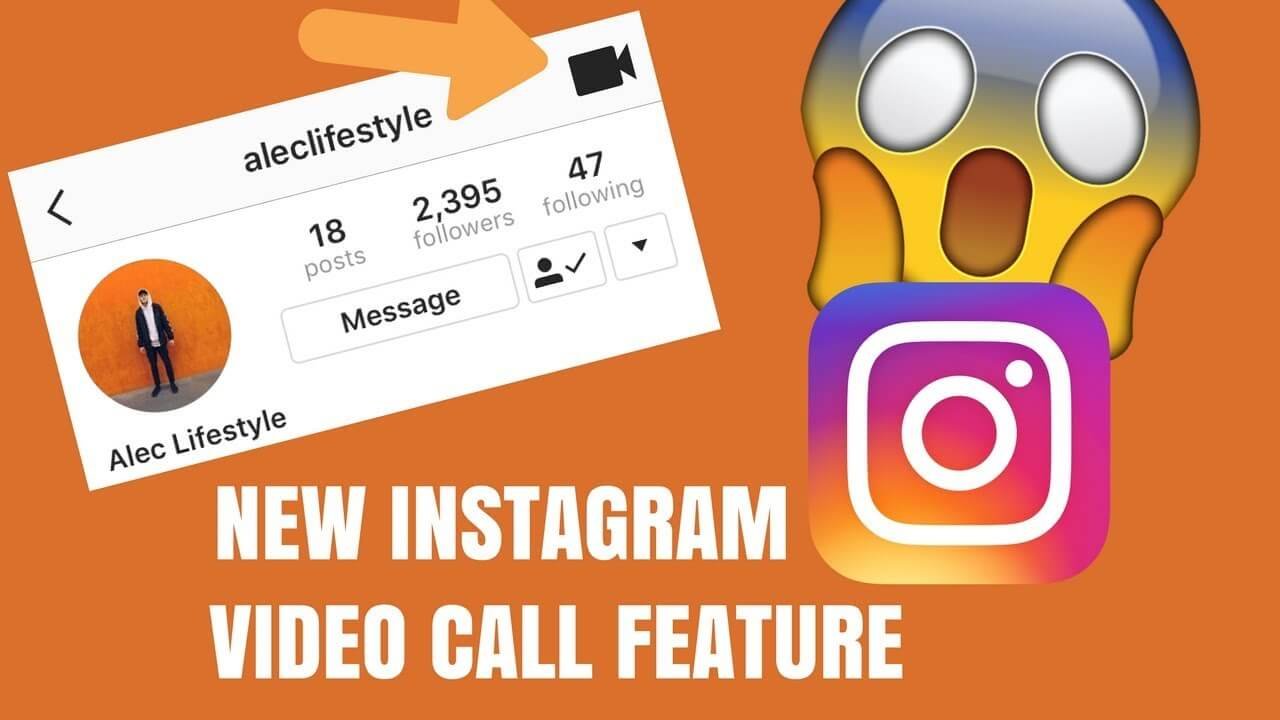
Video call will assist in enhancing your business as it will bring people closer together regardless of the location and moreover you can have group video chats as well. Several meetings were done to bring this feature ‘out’ but, finally, this feature became live in July 2018. With this feature, you can do a live video call with up to four friends at a time. The only problem is that you can call to only that follower with whom you have an active Instagram direct conversation or otherwise if you want to call someone else so, you have to send them DM first. This feature is very much helpful for the brands and business as they can introduce their products to different people with the help of video call and reaching out to four people at a time. Clients are available in the different location so if they want to discuss something so that can be possible on video call as well.

Add a Soundtrack to your Instagram stories

To add more personality to the Instagram profile, you can add music sticker to your profile. Hence Instagram launched ‘music feature’ which is available in Instagram stories. You can select any music sticker from thousands of the collection as per your mood. This feature is only available in android and iOS user and, also it is accessible in only some countries. This feature is suitable for the brand which has a music business, for example, you might own a vinyl records store, teach piano lessons, or even provide costumes for musical theater. You can showcase your music among your followers and share your favorite music from other artists with your followers that will not only show off your personality but also set your business presence in the industry. You might attract more followers by doing so and attract better music advice and inspiration.

New look to Explore page

If you have updated your Instagram app, then you might have noticed that there are a few changes on the explore page. This new launch which took place this month was redesigned in such a way that you can choose your interest. The new layout will include the top channel which you can see at top of the explorer page. Most topics are about your accounts and hashtag which you see frequently. There are some general topics as well as art, sports, beauty, and fashion. 

So to enhance your brand, the company can use the hashtag strategy which will help to increase their followers. According to the survey, 200 million people visit explorer page on daily basis to get or discover new ideas and moreover find inspiration so the brand has to keep in mind that they have to use correct hashtags so that you can get more users.


Answer People’s question with new question stickers

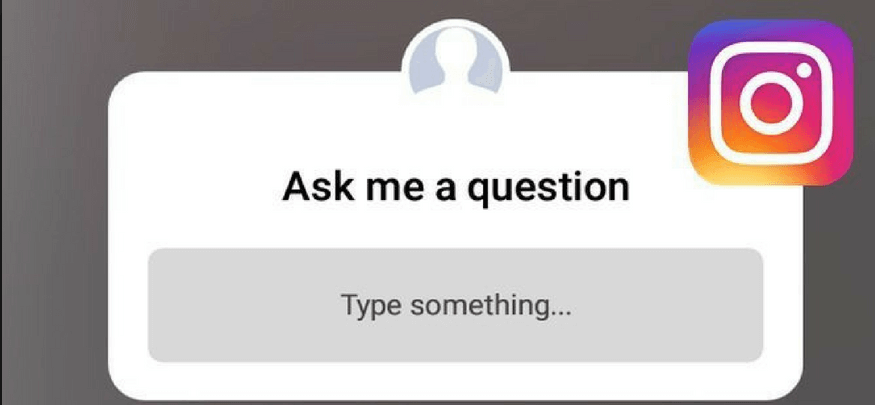
Instagram got more attractive and interactive with the launch of question stickers. This Instagram poll sticker and emoji slider allow followers to ask or vote on the question. With the help of this question sticker, you can interact with anyone all around the world. Once you add a question sticker to your Instagram story then, your followers can submit the question and, they will tell you to want information they want from you. For business point of view, it is live Q&A with your followers and customers. Moreover, they will find out what service they are expecting and on which product or parts they are interested. They will also help you to highlight pitfalls in your website and also missing information which customers can’t find online easily.

Shoppable Instagram posts

All business associates, this feature is very helpful. The user has to tap your post or Instagram Story to shop your products. It is the easiest way to increase traffic back on your website. The user will have a seamless shopping experience and they, will not leave your post or Instagram app for shopping. Previously, to promote the product you have to rely on using the “link in bio” call-to-action or hitting 10K followers to get the “swipe up” feature in your Stories to promote your products but now this feature has been modified and you can sell your goods with a single click.

Use Instagram carousel style posts

This feature of Instagram is there for quite a long time but if you are not aware of the Instagram carousel post so start using it as it will help you to enhance your business. If you are launching your new winter coat collection or a beauty business, the ability to share multiple product photos or videos in a single post is excellent for driving interest of the customers.

Conclusion

These all-new Instagram features are very significant in a business plan and also in marketing strategy which will help you to engage with your business community and also build a strong relationship with customers. Moreover, new features like question stickers and IGTV will give more chances to connect with the customer easily.
5 Awesome Social Media Management Tools

5 Awesome Social Media Management Tools


Today’s entrepreneurs do all sorts of things to stay ahead of their competition, which clearly has reached new heights. So, they spend huge amounts of money on creating some of the most spectacular websites, work on building powerful brands and invest in a variety of digital marketing channels including social media. In fact, there are countless reasons why your business needs a strong social media presence today more than ever. But do you know how you can make the most of it? With a social media management tool, of course!

What is a social media management tool?
A social media management tool is a software or web-based service that allows you to manage multiple social media accounts, schedule posts, collaborate with your team, track performance of your campaigns and much more in a well-organized environment.

If you want to get the best results from your social media campaigns, then using a proper social media management tool is a must. However, there are a variety of options in the market which have different features and prices. So, which one should you pick? Let’s find out!

What are some of the best social media management tools?
Although there are dozens of social media management tools that you can use today, the following are the ones that are highly recommended:

1. Hootsuite


Hootsuite was one of the pioneers of social media management and the years of experience it has now is apparent in the performance it delivers.

Hootsuite supports over 35 popular social media platforms including Facebook, YouTube, LinkedIn, etc. and allows you to manage all your profiles from a single dashboard. You can set up a stream for each account individually and organize multiple streams into groups with tabs. You can also auto-schedule your social media activities so that you are connecting and interacting with your fans even when you aren’t at the desk. You can easily upload your content files in bulk in advance and it will upload them for you as per the conditions set by you.

Some of the salient features of Hootsuite are:
  • Advanced team management facility
  • Customer service management for Twitter
  • Cross-platform support (Windows, Linux, Mac OSX, and even mobile platforms)
  • Free reports via email

2. TweetDeck


As the name suggests, TweetDeck is a social media management tool designed only for Twitter. However, if it’s only Twitter that you are focusing on, then it will help do you a terrific job at marketing and connecting with your target audience. It can help you fix all the problems because of which you are not getting results on Twitter– easily and quickly!

The first thing you need to know about TweetDeck is that it’s owned by Twitter (acquired it 2011) itself. Thus, you know you are in the right hands. However, you don’t have to trust it going by the face value alone. It does pack quite a punch with numerous options and features that make Twitter management more efficient and faster.

For starters, TweetDeck allows you to interact with your followers with multiple customizable columns rather than a single timeline. You can separate these columns on the basis of factors like hashtags, search results, and messages. You also get to schedule your Tweets (you can schedule tweets for multiple accounts too). Plus, there is a built-in analytics module that helps you keep a close eye on your Twitter performance across multiple accounts.

3. Tailor Social


Tailor Social is another top-quality social media management program that’s relatively newer than its counterparts. However, it offers many features that are non-existent in the old ones. This because apart from standard content automation features and social calendar support, it also helps you create premium content for your platforms on the go.

With Tailor Social’s design feature, you can create beautiful and unique images that you can share on your social media accounts directly. You can customize every small detail from font sizes to colours, and from photo filters to backgrounds. It also has a simple yet powerful analytics feature that allows you to track the performance on every individual post on the basis of factors like engagement and audience, all of which are presented in numerical values for measurable results.

4. Sprout Social

Simply put, Sprout Social is a collection of tools that are designed to help you manage all your social media channels with greater control and flexibility. Some of the features that make it stand out from the other options include influencer identification, smart inbox, and social listening. It even has a decent support for customer relationship management which is really important if you want to learn about your customers and enhance business efficiency.

5. Buffer


Although Buffer is known as a social media management program, it’s more along the lines of a “content publishing platform”. That said, it’s a powerful tool to have nonetheless.

You get all the features you would expect from a tool like Buffer including publishing and RSS. These include scheduling and adding posts and publishing posts from your blogs (with RSS). In For social engagement, you can use its Reply feature which makes it easier for you to respond to social conversations in a single team inbox. This means that you don’t have to switch from Facebook to Twitter or Instagram as you can respond to the messages from one location. You can also assign conversations to your team members or communicate privately with internal notes.

Overall, Buffer is indeed a quality product that you can benefit from a lot. The only thing missing here is support for influencer search but that’s not really a deal breaker unless you need it absolutely.
So, there you have it- some of the best “bang for a buck” social media management tools that you can use today. You can use most of these on trial and invest money only if you are satisfied. So, why not give them a shot and see for yourself what they have to offer? Good luck!
Actively Grow Your Twitter Followers in 4 Easy Steps

Actively Grow Your Twitter Followers in 4 Easy Steps

There is absolutely no doubt that Twitter can be immensely beneficial for your marketing campaign. The only problem is the fact that getting ahead on this social network is going to be much more difficult than you could ever imagine. If you do not get it right, there is a good chance that you’re going to be wasting your time and energy. 

You need to put together a game plan to ensure that you’re able to gain followers and convince them to follow your links. Getting ahead on Twitter isn’t too difficult. You just need to know the basics. Within this guide, you’re going to learn how to grow your Twitter followers.

Create Your Account

First and foremost, you need to make sure that you have a Twitter account. Getting one isn’t too tough. In fact, you can sign up for free. After you’ve done that, you need to set up your account in a way that makes it yours and yours alone. In order to do this, you should think about branding. You need to make sure that your account perfectly represents your company and your brand. You can use pictures, slogans, and other things. When someone visits your Twitter page, they should immediately recognize the purpose of the account. They should know that it belongs to your company.

Get Followers

Once you’ve got your account up and running, it is time to start getting followers. This will be much tougher than you might believe. Nevertheless, there are plenty of ways to get followers. Buying real Twitter followers is always one option. If you are looking for organic ways to find followers, you’ll need to put together a good plan. Make sure that you’re able to generate interest in your tweets. You’ll also need to learn how to use hashtags to your advantage. As long as you do that, you can guarantee that people will follow your account.

Stay Consistent


While you’re at it, you need to make sure that you remain consistent. If you stop posting, there is a good chance that you’re going to start losing posters. This is something that you need to avoid. After all, keeping followers is often more difficult than getting them in the first place. Make sure that you post consistently. Try to stick with things that were successful in the first place. As long as you do that, your account will flourish and your Twitter campaign will be worth your time and energy.

Schedule Everything

Finally, you should think about scheduling everything. This is one of the best ways to ensure that you’re able to keep your account active. It will also save you a lot of time in the long run. You just need to make sure that you create captivating posts first. Do that and use another program to schedule all of your tweets. This will ensure that your account continues posting even if you do not have time to do it manually. Follow these tips and you’ll get and keep followers in the long run.
Top 5 Unusual Instagram Analytics Apps You Can Afford

Top 5 Unusual Instagram Analytics Apps You Can Afford

Currently, over 500 million people around the world use Instagram every day. One can only guess how many different signals the platform users send every day. Instagram users mute publications of former classmates whom they are too polite to unfollow, send hundreds of emoji to stories or live videos of favorite celebrities, share posts from meme pages to friends’ DMs, and express their emotions through other tools from the rich arsenal of the Instagram mobile app.

Since the platform has long been warmly welcoming brands, the user’s signals in regards to what they like are read not only by their friends. Instagram businesses use them for a better understanding of what their potential clients want, what will capture their attention and sincere interest. Having such information on hand, ultimately, is a key to success, so if you want to achieve tangible results through marketing on Instagram, you need to monitor your Instagram account metrics closely.

Instagram Insights provides some information about your account, but overall it’s just basic stats about the posts, profile views and conversions. Time intervals for which information is given are limited to the last week only; Instagram analytics can only be accessed from a mobile device with Instagram account type switched to Business.

Luckily, there are plenty of different services providing quality Instagram analytics for accounts of any type, plus adding some handy functionality on top. Let’s overview some of the best tools for the task, skipping already well-known and hardly affordable for small brands, and see what they may bring to the table.

Plann


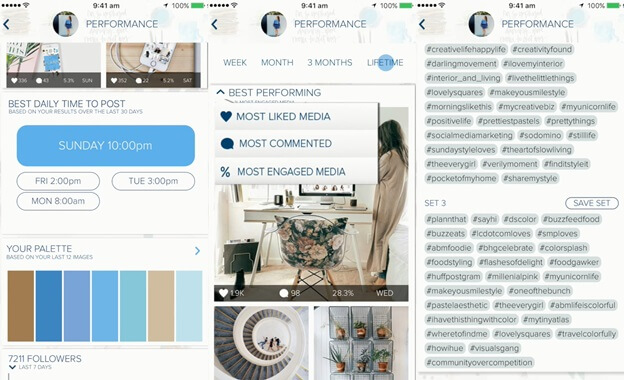
Essentially, it’s a visual Instagram planner, though the application’s functionality range goes far beyond curating the feed and scheduling the publications in an aesthetically pleasing order. Plann provides analytics on the color schemes your followers like the most, best-performing hashtags and posts. The Sneaky Peek feature allows comparing user stats to the competitors’, stealing hashtags they used, and finding out their best time to post.

Note that Plann doesn’t really auto-post Instagram publications for you, but it sends you a push notification reminding it’s time to post. Users can upload multiple photos at once to the application and then drag and drop the image grid, arranging it to their taste. Image editing, video uploading, carousel posts, Dropbox and Google Drive supported.

Combin

Created as an alternative to ruthless Instagram activity automation bots and pricey professional marketing services, Combin takes care of mundane tasks and provides tools for convenient and fast target audience search and attraction. The application helps to find interesting Instagram profiles and publications, filtering out interaction inefficient accounts, and engaging with current and potential followers en masse.

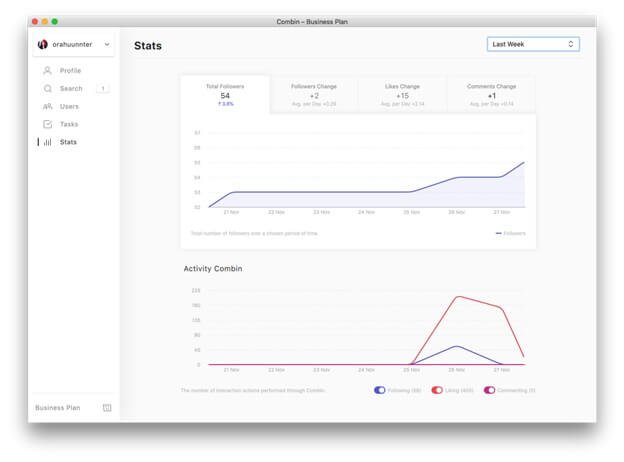
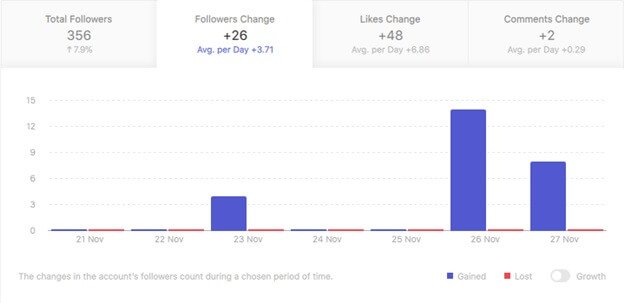
As it’s an Instagram growth tool, it’s only logical it has a built-in statistics module. Its specialized tab reflects weekly and monthly incoming and outcoming activity rate, as well as likes, comments and followers growth (with an average per day percentage!)


Hovering the cursor over graphs reveals more specific information about the account growth.

SmartMetrics


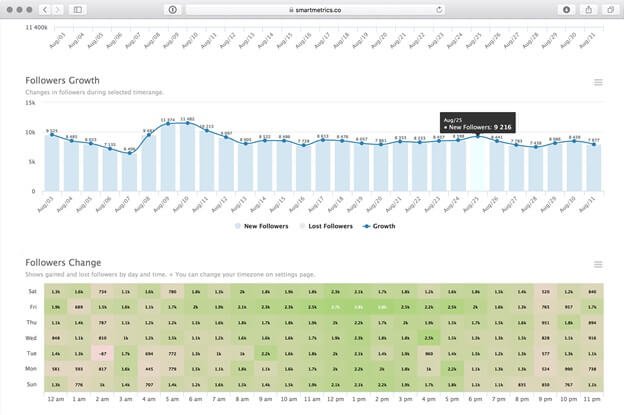
Even though SmartMetrics provides only Instagram business accounts analytics with no additional features for account management and marketing, it has a lot to offer stats-wise. The service gives informative reports on user account and their competitors’ alike: age, geography and demography analytics, engagement rates of stories, posts and profiles. All are updated hourly and can be exported to CSV and PDF.

Command for Instagram

This application for iOS is created for monitoring audience activity and growth on the go. Command suggests relevant hashtags to use in future posts’ captions, rates your engagement rate, comments to likes ratio, post frequency, and reports growth progress. It analyzes publications performance and shows detailed information about them (user and location tags usage, number of likes and comments, engagement rate).

Command has an international calendar with unusual holidays you may want to surprise-gratulate your following with. Christmas, New Year and other standard, wide-known holidays are left out of the calendar, having various not-so-obvious days instead (from fun Towel Day to serious Earth and Diversity days.)

Follow Cop


This is a utility tool for Instagram audience tracking and management for Android.
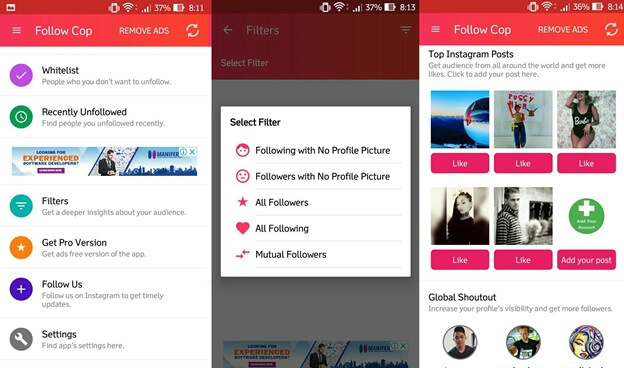
Follow Cop finds fake account among your followings and followers, accounts that don’t follow you back and determines fans (accounts you don’t follow back). It shows your recent unfollowers, top likes and commenters. The application allows whitelisting important accounts to avoid accidentally unfollowing them. Multiple account management is supported.

Follow Cop includes unique Global Shoutout functionality that lets you feature your profile and posts on the application’s main page for a fee of either real money or in-app currency. Follow Cop’s user exchange follows and likes for quick visibility and engagement boost.
How to optimize your Instagram account for search engines

How to optimize your Instagram account for search engines


Facebook bought Instagram for a billion dollars. Recently, Instagram has reached to such a height, that it generates over a million dollars a day in ad revenue. It’s good to the point that everybody currently needs more Instagram followers. Instagram is a versatile mobile application that enables you to take, alter and share photographs. Your loved ones can tail you on Instagram to see your image and video posts.

Instagram acts as a powerful platform from which marketers can take the advantage off. Many people are unaware of the fact that Instagram is difficult to get indexed in search results. This is only because the general population is not so keen in promoting themselves, In fact, Instagram itself blocks search engines from indexing its images. To dwell deep into the basics of Instagram, we made a thought to write this article that will talk about how to optimize your Instagram account for search engines.

Without any further do let’s get started!

1. Link straight forwardly to your Instagram posts

This is the most without a doubt the most crucial step. The Instagram web application is generally buried in JavaScript, and which means connections to your individual Instagram posts from your Instagram profile don’t consider “genuine” links as indicated by Google. Thus, the majority of Instagram posts are not indexed in the search lists.


You cannot promote your individual Instagram posts only by advertising or promoting your Instagram profile. With the goal for anyone to discover these posts in the search lists, you should link to them specifically from your different channels, by copying the link that guides directly towards the post.
If you need to normally incorporate a link to your post from as many platforms as you desire with the end goal to guarantee that the post gets indexed, this can be done only by using Instagram recap blog posts, or by adding citation links to your Instagram posts.

2. Creating image caption

We should treat Instagram image captions more like the title tags rather than adding them as Meta description; it should be short, catchy and crisp because when Instagram creates the page for the same, the same catchy tagline is included in the caption. It is even recommended to avoid emojis in the tags. The scenario gets even worse if emojis are added. Moreover, it is not a bad idea


Notwithstanding, it’s a smart choice to check where your title tag will frequently cut off and ensure that the most vital data is placed at the beginning of the caption. As with your profile, ensure that your caption is engaged with rich keywords; however, remember that this will likewise act as a call to action from the searched queries. A series of hashtags may bode well and look fine on Instagram, yet a title tag in the search lists will look significantly spammier.

3. Add specific keyword bio


Remember, while editing your profile; make sure your bio is optimized for the search results. You don’t have to work so hard to get it done, your Instagram bio is maximumly limited to 150 words, similar to the Meta descriptions for Google. Fortunately, “keyword stuffing” is pretty much worthy in an Instagram bio on the off chance that you are utilizing hashtag keywords and assuring that they are used appropriately. Instagram hashtags are interactive links that take users to a rundown of posts with the equivalent hashtag, so that, they are helpful for clients.

The bio renders as HTML and is crawlable via search engines, because it is the only main content on your page, so this is the place where a gigantic optimization happens. It’s a smart thought to get somewhere around a couple of words in your profile that aren’t simply hashtags, in any case, with the end goal to give the search engines more semantic meat to work with. Weight your profile as much as you can give the restricted space.

While you’re editing your profile, you ought to obviously additionally ensure that the “Site” field incorporates the URL for your brand’s site. While this is a no follow the link, it still acts as a source of referral traffic and shouldn’t be ignored.

4. Set your profile to public


Instagram profiles are set to public by default, which implies that anyone can get to your profile and the majority of your content. As a marketer, this is clearly how you need it. It’s a smart thought to cross check your privacy settings were never adjusted and guarantee this hasn’t been changed.

5. Instagram business tools

For some organizations, Instagram is just tied with the audience connections through stories, applicable photographs, and the next step in many cases is the paid advertising. While these things should start to initiate out, your subsequent stage should be using Instagram’s features that were made explicitly for business purpose.

These features enable you to see metrics on how certain posts are performing (sound well-known?), so they’re basically the Insights alternative of this social platform, and they’re accessible to everybody. A portion of this information incorporates impressions, engagement, shares, achieve, etc, all for your paid ads. You can discover these metrics by exploring the Campaigns of your account.

While Instagram isn’t a search engine friendly platform, making these additional strides will enable your Instagram profile and posts turn up in search results when comparable brands will probably be imperceptible. We prescribe working these steps into your procedure to give your Instagram profile a lift in perceivability.
7 Instagram Feed Ideas to Make Your Profile Shine

7 Instagram Feed Ideas to Make Your Profile Shine


Instagram is a popular social media platform tool that marketers, companies, and individuals now use to sell themselves out there to potential clients. With more than 500 million users checking their accounts on a monthly basis and sharing millions of images and videos, this is just the right place for placing your business and getting as much coverage as possible. We will show you how to get more Instagram followers.

The good thing is that in most cases, it will only cost your effort and a few data bundles to let the world know about your business. The trick with this platform is winning people’s hearts and having them to follow you. You need, therefore, to work on your feed to make sure it shines and attracts other users. Here are seven ideas you can use to make your Instagram feed look good and make your profile shine.

Have a Clear Strategy

Once you make a decision to create an Instagram account to grow your business outreach or to create brand awareness, then you need to have a clear outlook on what you want that particular account to look like. It should not be just like another random personal account that you just post anything. With this picture in mind, you will know the content to share, when to share it, who to tag and the color schemes and themes to use.

Stick to One Theme and Filters

Personal Instagram accounts seem to be all over with different filters and no clear theme. With an account that you want to draw followers to you, whether it’s a business or personal account, identify one particular filter for your images and one theme that people can identify with. The more people see this theme, the more they recognize your brand and the more awareness you create. Take advantage of the features provided on Instagram that can help you edit and curate your images and thus your entire feed in a particular and unique manner.

Have an Organized and Appealing Bio

As an introduction is to a book or a movie, your bio is the first place that users land before going through any other stuff that you might have. It is here that you need to make a good first impression. Introduce yourself in a creative manner, let potential followers know what your brand or business is all about, and maybe add a link that leads to your official site if you have one. The bio is your chance to convince a new user to either follow you or simply move on, so make it work for you.

Use the Preview App

As mentioned earlier, it is important to have an organized feed and profile as a result. Once you have decided what to post, you can use this app to preview how your feed will look like before publishing your content. If it is within your plans, then you can proceed and publish, but if it is not yet according to your plan, you can take time to edit, rearrange and reschedule your photos.

Select a Suitable Layout

Getting a layout is one of the easiest strategies you can use to have an organized Instagram feed. There are nine different layouts available on Instagram. You can choose these depending on the content you intend to post and the nature of your account.

Choose an Appropriate Color Scheme

If you have noticed, most accounts that have a massive following have a particular color scheme. For instance, you will find accounts that present beauty products with pink as their color in most instances. You can choose one, two or three colors to use, but be consistent with them. In line with a consistent color palate, ensure that you keep the background of your images the same.

Take Advantage of Insta Stories

Most new users never have time to go through your entire profile checking out your images not unless they develop a special kind of interest. They simply scheme through the Insta stories as they move on to other users. This is where Insta stories come in. Post interesting and appealing content on your stories. Remember, Instagram is all about entertainment. The more you get your audience entertained, the better chances you will have of getting followers.
7 Surefire Ways Instagram Will Drive Your Marketing into the Ground

7 Surefire Ways Instagram Will Drive Your Marketing into the Ground

Instagram is a social media platform familiar to many. It is one of the world’s fastest growing apps. Over the past years, it has continued to attract massive users. Currently, it is estimated that over one billion people use it. As a visual platform, it promotes resourcefulness, interaction, expression, and innovation for its users. This has encouraged the use of the platform for business. Businesses have taken the idea of using this platform quite seriously. Instagram has even gone ahead to create a business profile for businesses.

A business profile is equipped with tools that enable grow your business through visual content and the trending hashtags for your niche. Advertising on Instagram creates opportunities for a business to connect with new audiences. If you have been using Instagram for a long time, you may have witnessed advertisements from other businesses showing up on your feed. Nonetheless, there are drawbacks of marketing on IG as well. Below are ways Instagram will drive your marketing to the ground:

1. Limited Audience

Instagram has a huge user-base. Most of the users of Instagram are aged between 18- 29. If your product targets this age group then this is an excellent platform to market. If your products or business targets the older audience, then adverts on this platform would be useless. You may invest in paid ads, but they most likely won’t turn to profit. This ambiguity may dent the business. It will thus be better to spend your resources on other marketing platforms. It is critical to know your target audience and give them something that reverberates with them.

2. Links Are Less Effective


Adding links to posts is a great marketing strategy. These links direct the interested audience to the business website, and potential purchases are established. Instagram does not allow users to place clickable links on their posts. Clickable links are only set in the Instagram stories. Nevertheless, they are only allowed to business profiles with over 10,000 followers and verified users of Instagram. This drawback, therefore, means most businesses will be unable to drive traffic to their websites. A large number of users will only like the posts and move to the other post on their feed. The businesses that depend on website traffic will consequently be in trouble.

3. Less Advanced Features on IG

If you have worked with the Facebook Ads before you will notice they are much advanced compared to Instagram ads. A good example you can set up a campaign that encourages likes to your page on Facebook. This feature is not available on IG. This limitation becomes a disadvantage especially when you want to build your business profile followers. The detailed targeting feature is also missing in the Instagram ads. This limits targeted marketing that is used to encourage buying and interaction.

4. Time-Consuming


As expected in any marketing platform interaction is vital. Instagram ads are time-consuming because they need frequent updating and monitoring. Since Instagram is more visual, collect and update your photos/videos frequently. Systematic visual content is key when it comes to Instagram marketing. Consumers will always interact with the posts. They may comment, ask questions, and need clarification. Frequent monitoring is essential. If you do not do this, you lose the potential consumers. Most business profiles end up employing people to interact with and update their profiles and ads.

5. Word Limiting

For effective marketing, some businesses need to use a substantial amount of written content or text. Instagram, is word limiting. One may use creative ways to lure readers to another post for continuation or to a specific site. This ensures effective marketing. You may be wondering if that hustle worth it. Believe it or not, effective marketing for some brands is supported by the well-organized description. If this is your case, you may find Instagram very limiting.

Using Instagram for marketing should not contribute to the downfall of your business. You must be wondering whether to switch to other platforms. The best tactic is to embrace what works for you. For those features, where IG lack in: consider other advertisement platforms. Instagram is one method of delivery that you can use to connect your brand to new audiences.